
2.1 Installation and Updates
Power Trader uses a self-updating installation that automatically installs the latest version of the program available. You must have an active Internet connection during the installation process.
To install Power Trader:
- Download BNFX Power Trader from the platform download page.
- Run BNFXPowerTrader.exe. The Setup Wizard screen appears. Click Next.
- Change the destination folder if desired. Click Next followed by Install.
- With the Launch Power Trader checkbox selected, click Finish.
- After a moment, the Update Manager starts. The Update Manager checks for the latest version available, downloads required files and installs them. You can watch the progress in the Update Manager window.
NOTE: The average size of data downloaded during the initial update process is around 25MB.
- After the Update Manager finishes, Power Trader starts by prompting you to log in (see Logging In).
2.1.1 Updating Power Trader
Every time you start Power Trader, the Update Manager checks for updates automatically. Whenever an update is available, the Update Manager displays a message asking you to confirm the update. If you click Update, the update downloads and installs. You can choose Cancel and install the update at a later time.
NOTE: Your settings and login information (if saved) may or may not be preserved after an update. The settings are usually preserved if they are compatible with the new version.
2.1.2 Uninstalling Power Trader
To uninstall the program, select Start > Programs > Power Trader > Uninstall Power Trader. Click Yes in the confirmation dialog.
2.2 Logging In
When you start Power Trader, the following screen appears.
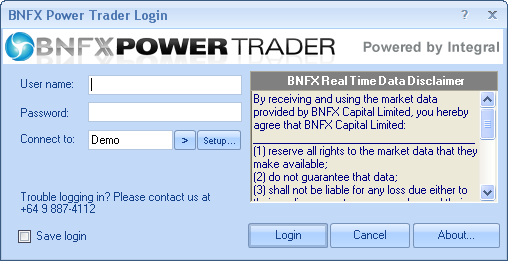
Figure 1: Log In Screen
To log in:
- Enter your user name and password in the appropriate fields.
- Select a Demo or Live server from the Connect to: field, by clicking the arrow button next to the Connect to: field, depending on the type of account you are logging into.
- You can check Save login to save your credentials. The next time you log in on the same computer, the User name and Password fields fill in automatically for you.
- Click Login.
2.2.1 Connection Options
Click the arrow button next to the Connect to: field to shows the available options for you to connect.
2.3 First Time Login
When you log in to a new account for the first time, you may be required to change your password after you enter your login and password for the first time (see Changing Your Password).
NOTE: Demo accounts may only be valid for a limited number of days and may be removed from the system upon expiry. To open a live account or a new demo account, please contact BNFX support.
2.4 Changing Your Password
NOTE: The password must be at least 6 characters in length and is case-sensitive.
To change your password:
- Select View > Change Password. The Change Password dialog box appears.
- Enter your current password, then enter your new password twice. Click OK to complete the change.
CAUTION: For security reasons, avoid using words or easy-to-remember character sequences as your password. For example, 12345 or qwerty are poor choices and using password as your password is not an original idea (it is among the most common and therefore most easily guessed passwords in the world). Likewise, do not use such obvious things as your name or last name. We recommend that you change your password regularly (this is especially true for live accounts). Strong passwords contain at least one lower case letter, one capital letter, one number, and preferably at least one symbol. For example: monEyM@ker. Use your best judgment.
Back to BNFX - An Integral Power Trader Forex Broker
Power Trader is a product of Integral Development Corp., licensed and customised for BNFX Capital Ltd. All rights reserved.
RISK WARNING: Forex trading involves risk of loss and may not be suitable for all investors.