
9.1 Reports
Power Trader can produce various reports for you from the Reports option under the Tools ribbon.
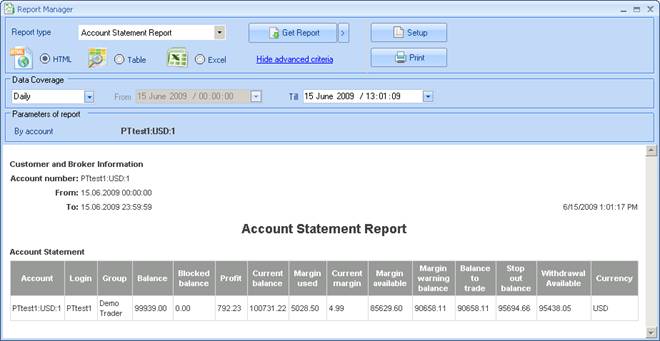
Figure 77: Report Manager Panel
You can choose to generate the report in the following formats:
- HTML: The report displays in the Report Manager. You can save the file to your workstation for archiving or for further processing and analysis.
- Table: The report displays in the Report Manager. This format is intended for printing. You can further sort, filter, and arrange the table. see Managing Table Data for more information.
- Excel: The reports is saved as a CSV (comma-separated values) file. If you workstation is configured correctly, the report opens in Microsoft Excel.
To create a report:
- Click the Tools ribbon.
- Click the arrow underneath the Report button and choose a report from the drop-down list or click the Report button to open the Report Manager window and choose a report from the Report type drop down menu.
- Choose to display the data in HTML, as a Table, or in Excel format.
- Click the Hide/Show advanced criteria link to toggle additional options that are available depending on the kind of report you chose from the ribbon.
- Enter any additional criteria to narrow your report results.
- Click Get Report.
By default, the results of an HTML or Table report are displayed in the Reports window. To display the report results in a new window, click the arrow button  next to the Get Report button and choose "In separate window" from the pop-up list.
You can then print the report by clicking the Print button. This opens a Print Preview window that allows you to change the page margins and printer options, and to print the report. The Setup button in the Report Manager window allows you choose printing options as well.
Back to BNFX - An Integral Power Trader Forex Broker
Power Trader is a product of Integral Development Corp., licensed and customised for BNFX Capital Ltd. All rights reserved.
RISK WARNING: Forex trading involves risk of loss and may not be suitable for all investors.